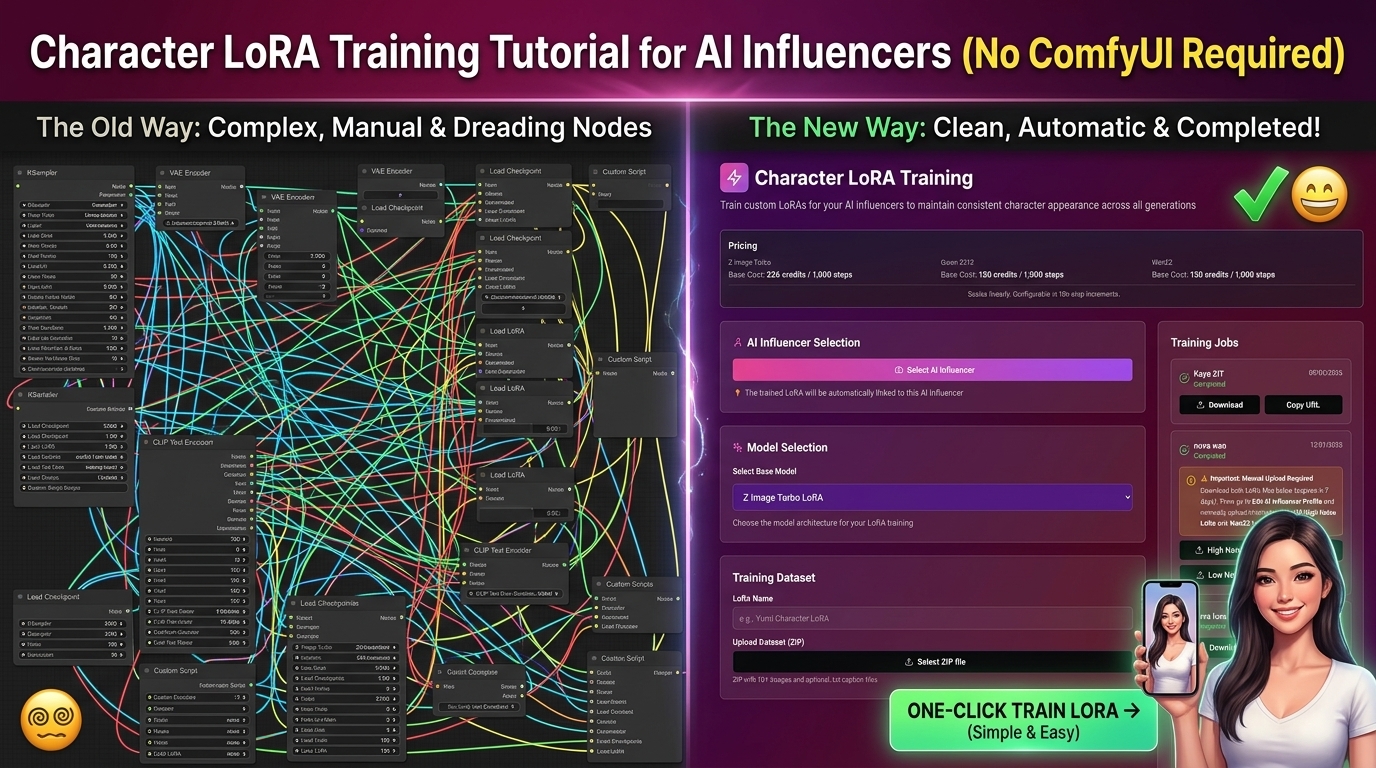
Character LoRA Training Tutorial for AI Influencers (No ComfyUI Required)
Character LoRA training is the single most important technical step in building an AI influencer business — and the one that stops most people cold. Search for "character LoRA training tutorial" and you'll find a wall of ComfyUI node graphs, Kohya training scripts, Google Colab notebooks, and GPU requirements. For someone who just wants to create a consistent AI character and start posting content, it's overwhelming.
This guide takes a different approach. We'll explain what LoRA training actually is, why it matters for AI influencer creators specifically, and how to do it in under 40 minutes — without ComfyUI, without a GPU, and without any technical background.
What Is Character LoRA Training? (Plain English Explanation)
LoRA stands for Low-Rank Adaptation. It's a technique for fine-tuning an AI image or video model on a specific subject — in this case, your AI influencer character — so that the model learns to reproduce that exact person consistently across unlimited new generations.
Think of it this way. A standard AI image model like Flux or Stable Diffusion has been trained on billions of images and can generate any person — but it doesn't know who your character is. Every time you generate an image, the model makes its own interpretation. The face shape changes slightly. The eye color drifts. The proportions shift. Over 100 images your "AI influencer" looks like 10 different people.
LoRA training teaches the model specifically about your character. You show it 15–20 images of your character from different angles, let it study those images for 20–40 minutes, and it creates a small model file — your LoRA — that can be applied to any future generation. From that point forward, every image and video you generate uses the same face, body type, and distinctive features, permanently.
Why this matters for AI influencers specifically: Audience loyalty is built on character recognition. Instagram followers who recognise your character's face keep coming back. Fanvue subscribers who feel attached to a specific persona stay subscribed. Without LoRA training, you're generating fresh variations of a vague character — not building a recognisable brand.
The Traditional Approach (And Why It's Painful)
The "standard" way to train a character LoRA involves:
- Installing ComfyUI — a complex node-based AI workflow software with a steep learning curve
- Setting up Kohya_ss — a separate LoRA training framework requiring command-line setup
- Configuring training parameters: learning rate, network rank, batch size, number of steps, caption format, resolution, gradient accumulation, optimiser selection
- Running training locally (requires a capable GPU — minimum RTX 3060 12GB, ideally RTX 4090) or on a cloud service like RunPod
- Monitoring training loss curves and evaluating sample outputs at different checkpoints
- Troubleshooting when outputs are blurry, overfit, or inconsistent This process is genuinely powerful when you know what you're doing. The r/StableDiffusion community has produced excellent guides for it. But for someone who wants to build an AI influencer business — not become an AI researcher — it's weeks of learning before you generate a single usable image.
The good news: in 2026 you don't need to do any of this.
The One-Click Approach: AI Influencer Studio
AI Influencer Studio handles the entire LoRA training pipeline in a single interface — no ComfyUI, no Kohya, no GPU, no command line. You upload images, click train, wait 20–40 minutes, and your character LoRA is ready to use across 30+ generation tools.
Here's the complete step-by-step process.
Step-by-Step: Training Your Character LoRA
Step 1 — Generate Your Training Dataset (15–20 Reference Images)
The quality of your training dataset is the most important variable in LoRA training. Better input images = better, more consistent character output.
Option A — Generate images from scratch (recommended for new characters)
Use the Image Studio in AI Influencer Studio to generate your reference images before training. This is the cleanest approach because you control every aspect of the character's appearance from the start.
Use Nano Banana Pro or Flux 2 Flex for realistic human characters. Generate images with the following specifications:
- Angles: Front-facing (5–6 images), three-quarter left (3–4 images), three-quarter right (3–4 images), profile left (2 images), profile right (2 images), full body (2–3 images)
- Lighting: Vary between natural daylight, soft studio light, and golden hour. Avoid heavy shadows on the face.
- Background: Use neutral, clean backgrounds for all training images — white, grey, or soft bokeh. Complex backgrounds confuse the training process.
- Expression: Mix of neutral expression (for establishing features), slight smile, and full smile. Avoid extreme expressions in training data.
- Clothing: Keep clothing simple and non-distracting. Plain colours work best. Avoid heavy patterns or logos.
- Resolution: Generate at the highest available resolution — at least 1024×1024. Option B — Upload existing images (for characters already created)
If you have existing reference images of your character (from a previous generation session or purchased from a generator), you can upload those directly. Apply the same quality standards — varied angles, clean backgrounds, consistent appearance.
What to avoid in training images:
- Sunglasses or anything covering facial features
- Heavy filters or stylised effects
- Motion blur or low resolution
- Multiple people in the same image
- Heavily edited images where facial features have been warped
Step 2 — Access the LoRA Training Tool
In AI Influencer Studio, navigate to Character LoRA Training from the main dashboard or the left sidebar.
You'll see the dataset upload interface. This is where the technical complexity that normally requires Kohya_ss is completely abstracted away — you don't need to configure a single parameter manually.
Step 3 — Upload Your Dataset
Upload all 15–20 reference images in one batch. The platform accepts JPG and PNG at any resolution — it handles preprocessing, captioning, and resolution standardisation automatically.
Captioning note: One of the most technically complex parts of manual LoRA training is writing accurate captions for each training image (describing what's in the image so the model learns the right associations). AI Influencer Studio handles this automatically using vision-language models that analyse each image and generate appropriate captions. You don't need to write a single caption manually.
Step 4 — Name Your Character and Start Training
Give your character a unique trigger word — this is the term you'll use in prompts later to activate the LoRA. Choose something specific and unusual that wouldn't appear in the base model's training data.
Good trigger words: n4om1, z4ra_ai, l3xi_model, kyr4_studio
Bad trigger words: girl, woman, model, sarah (too generic — conflicts with base model knowledge)
Click Start Training. The platform handles all configuration automatically — learning rate, network rank, training steps, optimiser selection — using parameters optimised for human character LoRAs specifically.
Training time: approximately 20–40 minutes depending on dataset size and current server load.
Step 5 — Evaluate Your LoRA
When training completes, your LoRA appears in the Character LoRA Library. Test it immediately by generating a few sample images using different prompts — different outfits, locations, and lighting conditions — to verify consistency.
Signs of a well-trained LoRA:
- Same face structure across all generations
- Correct eye colour and shape reproduced consistently
- Consistent hair colour and general style
- LoRA doesn't "fight" with the base model — outputs look natural, not distorted Signs of a problematic LoRA:
- Blurry or distorted facial features (usually caused by low-quality training images)
- Character looks almost right but key features drift (try retraining with more images of the problematic feature)
- Outputs look too similar to each other, lacking variety in pose/expression (overfit — reduce training steps or dataset uniformity) For most datasets of 15–20 high-quality images, the first training run produces a usable LoRA. If results are slightly off, a second training run with a refined dataset typically resolves it.
Step 6 — Deploy Your LoRA Across All Tools
Once your LoRA is in the library, select it as your active character in the AI Influencer selector at the top of the interface. This applies your trained character automatically to every tool you use — image generation, video generation, Fanvue content creation, magazine generation, brand kit generation — without needing to re-specify it each time.
This "train once, use everywhere" architecture is the key advantage over the ComfyUI approach, where you'd need to manually load the LoRA into each workflow and configure it separately for every model.
Advanced Tips for Better LoRA Results
Train separate LoRAs for different content types. Your primary character LoRA handles all SFW content. If you're creating NSFW content for Fanvue, train a separate LoRA on a dataset that includes the anatomical features you want to generate consistently. This keeps your SFW and NSFW workflows cleanly separated.
Add hero shots to your dataset. Include 2–3 particularly high-quality images that represent your character at their absolute best. The training process doesn't weight images equally — the clearest, highest-contrast images tend to have more influence on the final model.
Update your LoRA as your character evolves. If you change a major aspect of your character's appearance after a few months (new hair colour, different style aesthetic), retrain your LoRA with updated reference images. You can maintain multiple versions in your library.
Use your LoRA with strength settings. In generation prompts, LoRA strength controls how strongly the character identity is applied. Standard content works well at 0.7–0.9. For close-up portrait shots where face accuracy is critical, push to 1.0. For full-body fashion shots where pose variety matters more than exact face replication, 0.6–0.7 gives more creative flexibility.
Combine with face-swap for videos. For video models that don't natively support LoRA application (some video models work differently than image models), use the Character Swap tool in AI Influencer Studio to apply your character's face after generation. This gives you consistent character identity across every video model in the platform.
LoRA Training for Different Content Niches
Luxury lifestyle / fashion AI influencer: Dataset focus: varied fashion outfits, clean studio and outdoor backgrounds, professional lighting. Prioritise sharp facial detail over variety of expression. Your character will primarily appear in aspirational settings — make sure the training images reflect that aesthetic baseline.
Fitness AI influencer: Dataset focus: activewear outfits, gym and outdoor backgrounds, good muscle definition visibility. Include full-body shots in multiple angles — these characters need to look consistent in body proportion, not just face.
Gaming AI influencer: Dataset focus: casual and gaming-specific outfits, RGB-lit room backgrounds, more expressive facial shots. Gaming audiences respond to personality — train with more varied expression images than other niches.
Fanvue / adult content AI influencer: Train your primary SFW LoRA first using the standard process above. For NSFW-specific training, use a separate dataset and the WAN 2.2 / WAN 2.6 compatible training workflow. Keep the two LoRAs separate — your SFW LoRA for Instagram and social media content, your NSFW LoRA for Fanvue PPV content.
How Long Does Character LoRA Training Take?
With AI Influencer Studio, the full process from zero to a usable character LoRA takes:
- Dataset generation: 30–60 minutes (generating 15–20 reference images)
- Dataset preparation: 5 minutes (upload and review)
- Training: 20–40 minutes (automated)
- Evaluation and testing: 10–15 minutes Total: 1–2 hours for your first character LoRA. Subsequent characters take less time once you're familiar with the quality standards for training images.
Compare this to the ComfyUI/Kohya approach: 1–3 weeks to learn the tooling, plus 2–8 hours per training run (depending on GPU), plus significant debugging time for most first-time trainers.
Common LoRA Training Questions
How many images do I need to train a character LoRA? 15–20 high-quality images is the sweet spot for human character LoRAs. Fewer than 10 tends to produce inconsistent results. More than 30 rarely improves quality and can actually hurt results if the extra images introduce inconsistency in the character's appearance.
Do I need a GPU to train a LoRA? With AI Influencer Studio, no. The training runs on cloud infrastructure — you just upload your images and wait. The traditional ComfyUI/Kohya approach requires a GPU (minimum RTX 3060 12GB for practical training times).
Can I train a LoRA on a real person's photos? You can technically train a LoRA on any photos, but using real people's images without consent raises serious ethical and legal issues. AI Influencer Studio's terms require that training datasets comply with applicable laws and platform policies. Always train on images you've generated yourself or have rights to use.
Will my LoRA work with all AI models? LoRAs are model-specific — a LoRA trained on Flux Schnell won't work on WAN 2.2. AI Influencer Studio handles this automatically, training LoRAs compatible with its primary generation models. The Character Swap tool bridges the gap for video models that use different architectures.
How do I use my LoRA in prompts?
Once your LoRA is selected as your active character, include your trigger word in generation prompts: [trigger_word], woman in luxury hotel room, fashion editorial lighting, 4k. The platform automatically handles the technical LoRA activation syntax — you just use the trigger word naturally in your prompt.
Getting Started
Character LoRA training is available free in AI Influencer Studio — no credit card required for the free tier, no GPU needed, no ComfyUI knowledge required.
The free credits on signup are enough to generate your training dataset and complete your first LoRA training run before committing to a paid plan. Once trained, your character LoRA is available permanently across all 30+ generation tools in the platform.
→ Train your first character LoRA free at AI Influencer Studio
Last updated April 2026.
Related Articles
Best Free AI Influencer Video Generator in 2026 (7 Tools Tested)
We tested every major free AI influencer video generator in 2026. Here's an honest ranking by video quality, character consistency, free tier limits, and which one actually lets you build a monetizable AI influencer.
Best Higgsfield AI Alternative 2026 — Cheaper, More Features, Same Models
Higgsfield credits burning too fast? Need LoRA training or Fanvue support? We compared every major Higgsfield alternative in 2026 and matched each one to your actual use case.
How to Create an AI Influencer and Make Money in 2026 — Step-by-Step
The honest, complete guide to creating an AI influencer and earning real money in 2026. Real income numbers, exact tools, step-by-step workflow, and what no one tells you about the timeline.